

A client, landlord, or event venue asks for your Certificate of Insurance (COI), but what exactly is that?
A COI is simply proof that your business is insured. It’s a one-page summary that helps you show clients you’re covered, credible, and ready to go!
TL;DR: What Is a COI?
A COI is a single document that includes information about your small business insurance:
- Who’s insured: You/your business info
- Who’s backing you: Your insurer’s info
- What’s covered: The types of insurance you hold
- How much coverage: The dollar limits of your coverage
- Who asked for it: The certificate holder
What Is On a Certificate of Insurance (COI)?
A Certificate of Insurance sums up the most important parts of your coverage on a single page.
Every COI includes a few key details:
- Your business information (the insured): Who’s covered under the policy
- Your insurance provider (the producer/insurer): The company that issued your coverage
- Policy types and numbers: What kinds of insurance you carry, like general liability or professional liability
- Coverage limits: The dollar amounts your policy covers per incident and in total
- Effective and expiration dates: When your coverage begins and ends
- Certificate holder information: The client, venue, or organization requesting proof of insurance
Every Section of a COI, Explained
What might look like a wall of boxes and fine print is really just a summary of information that tells a story about your coverage. Here’s how to break your COI down, section by section.
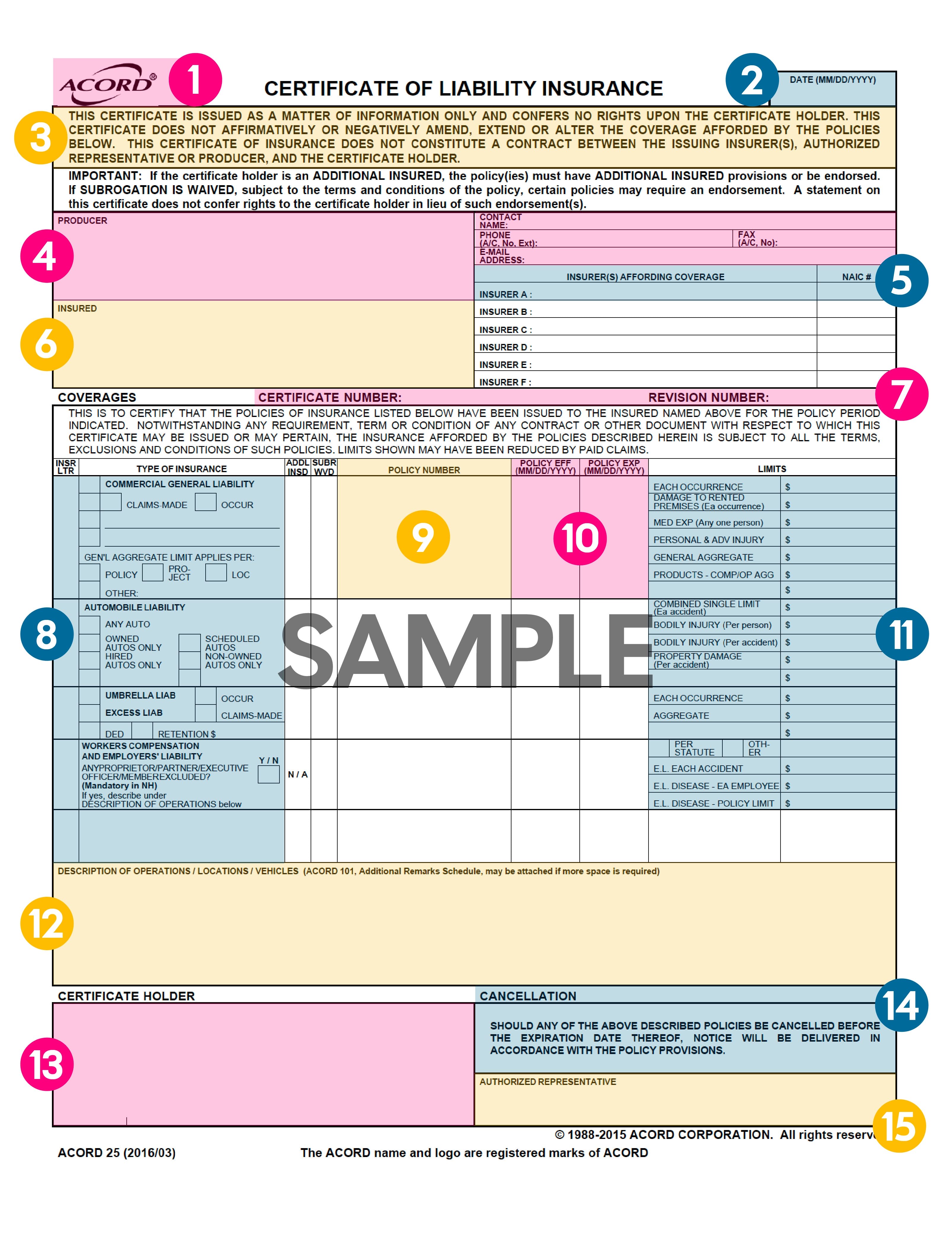
1. ACORD
“ACORD” stands for Association for Cooperative Operations Research and Development. They’re the group that created the standard COI form most insurers use (the ACORD 25). Think of their logo like an official seal that legitimizes your document!
If you see this name at the top of your COI, that means your document follows the standard layout accepted everywhere. It’s not the name of the insurance agency, carrier, or the actual document.
Pro Tip: You may occasionally hear someone ask to see your ACORD or ACORD COI . What they really mean is your COI! There are many names people use to refer to this document.
2. Date
This is the day your COI was issued, and the form was made, which is usually the same day you bought or updated your policy.
Note: The date does not always have to match the “policy effective date” or Policy EFF date. You may buy insurance today, but opt for coverage to begin a few weeks from now (your Policy EFF date).
3. Disclaimer
The disclaimer is a quick legal note that says this document is for proof only. It doesn’t change or expand your insurance policy; it just summarizes it.
Similar to a movie trailer, this document provides highlights rather than every single detail (that’s what your policy documents are for).
4. Producer
This box lists the insurance provider or broker who issued your COI. For example, Insurance Canopy would be listed here.
The producer is your point of contact for everything related to your COI, like:
- Adding a venue or client
- Updating policy wording
- Fixing a typo in an address
Pro Tip: Think of the producer as your insurance “help desk.”
5. Insurers Affording Coverage
This section lists the insurance company (or companies) backing your policy. If you have more than one policy, you might see multiple insurers here labeled as Insurer A, Insurer B, and so on.
The insurers listed here are the ones that actually handle and pay for claims if something goes wrong. You likely won’t ever hear from them or talk to them unless you have a claim, but they’re like the parent owners of your policy; we help advertise and sell it for them (which is why most customers only ever interact with us).

6. Insured
This is you or your business, because you are the policyholder. It includes your official business name and address.
Be sure this information is correct! If your name is misspelled or incomplete, a venue could reject your COI. Only use the exact legal name from your policy and tax documents.
7. Certificate Number and Revision Number
These two items appear near the top of your Certificate of Insurance, right above the coverage table. They’re easy to miss, but they’re important for tracking and accuracy.
The Certificate Number is a unique ID your insurance provider uses to track this specific certificate. It’s like a reference number for your proof of insurance (not your policy itself). This is helpful if you request multiple COIs for different clients or venues since each one receives a unique certificate number.
The Revision Number shows how many times your certificate has been updated. If you’ve added a new venue, changed a date, or adjusted your limits, the revision number increases so everyone knows they’re looking at the most recent version.
Key Information
Your certificate number helps your insurer keep accurate records, while your policy number identifies your actual insurance contract.
- Policy Number: Your insurance account
- Certificate Number: The individual document proving that the account exists
- Revision Number: Tracks the most recent version of your certificate
8. Type of Insurance
Here you’ll see all the coverages you’ve purchased, like general liability, auto liability, or professional liability. Each coverage type is listed next to its “insurance letter” (A, B, C, etc.), which matches the insurer that provides it.
| Coverage Type | What It Is | When It Applies |
|---|---|---|
|
– Protects you if someone gets hurt or property gets damaged because of your work |
– On every policy (most common coverage) |
|
|
– Coverage for vehicles you use for work (even occasionally) |
– Appears if auto coverage is purchased |
|
|
Umbrella and Excess Liability |
– Adds extra protection on top of your other policies |
– Applies after standard limits are used for claims |
|
Workers Compensation and Employers Liability |
– Workers comp for employee work-related injuries and illnesses |
– Only applies if you hire employees |
|
– Covers you if your professional advice or services cause a financial loss to a client |
– Appears if your policy includes professional liability, or coverage is added |
|
|
– Protects you if someone is hurt or property is damaged from a product you sell (even after the transaction) |
– Applies if your policy includes product liability, or coverage is added |
*Can be included in the general liability section if it’s endorsed there, and no auto policy exists.
**Can appear combined with the general liability section.
Quick-Reference COI Term Glossary
You’ll likely see these terms used throughout these coverage tables:
- Each Occurrence: The limit your insurer pays per incident (usually $1,000,000)
- General Aggregate: Total your insurer pays in a year (often $2,000,000)
- Products and Completed Operations: Covers work you’ve finished (like catering or products sold)
- Claims-Made: Covers claims only if they’re filed while your policy is active
- Occurrence: Covers incidents that happen during your policy term (between the effective and expiration dates), even if the claim is filed after the policy ends
9. Policy Number
This is the policy number associated with your coverage. It’s not uncommon to have more than one coverage using the same policy, like general and professional liability. That just means they are on the same policy.
You’ll only typically see a different policy number for coverage like workers comp, auto insurance, or excess liability.
10. Policy EFF and Policy EXP
The “Policy EFF” is the start date (or EFFective date) of your coverage. Your protection begins on this day, so any incident before this date wouldn’t be covered.
The “Policy EXP” is the date your coverage ends (aka the EXPiration date). If you have an ongoing job or event, make sure your policy dates cover the entire period, or that you are set to have your policy renewed on or before this date to avoid a coverage gap.

11. Policy Limits
This box lists the maximum amount your insurer will pay for each type of claim covered by a particular kind of insurance. Different types of insurance carry their own occurrence (per claim) and aggregate (per policy) limits, as well as unique coverages.
Pro Tip: Always confirm your limits meet requirements before sending the COI.
12. Description of Operations / Locations / Vehicles
This field includes custom notes, like venues, clients, or properties listed as additional insureds. It may also mention additional coverage specific to the certificate holder, such as waivers of subrogation, if you’ve added that to your policy.
Note: If this field doesn’t match what your client asked for, your COI might be rejected — even if your coverage is correct.
13. Certificate Holder
This is the person or organization requesting your proof of insurance. It could be different from an additional insured (someone requesting to be named on your policy), but they’re often the same.
Note: An additional insured (AI) is always a certificate holder, but they receive the benefits of your policy through the AI endorsement. A certificate holder does not receive these benefits unless specifically added as an additional insured.
14. Cancellation
This notice explains how the certificate holder will be notified if your policy ends before the expiration date. It doesn’t change your coverage; it’s just a courtesy notice for them.
Note: A certificate holder typically needs proof of insurance to clear you for work, hire you for jobs, or agree to contracts, so changing or canceling coverage could put you at risk of losing those opportunities.
15. Authorized Representative
This is where your broker or insurance agent signs to make the COI official. If this line is blank, your certificate isn’t valid, so always look for that signature.
16. Additional Remarks Page
If your COI runs out of space (usually in the “Description of Operations” section), your insurer will attach this page to list extra details, like more insured parties or properties, on a second page.

COI vs Policy: What’s the Difference?
Your insurance policy consists of several pages of documents, breaking down details of your coverage, limits, and exclusions. A Certificate of Insurance (COI) is like the receipt that summarizes every part of your policy on one single page.
A COI shows proof of coverage, while a policy describes how your coverage works.
Certificate of Insurance (COI)
✔️ 1-page summary of coverage
✔️ Proof you’re insured
✔️ Used for clients and venues
✔️ Quick to share and update
Insurance Policy
✔️ Full legal contract of coverage
✔️ The actual coverage details
✔️ Used between you and your insurer
✔️ Dozens of pages long
How to Read and Review a COI
Before you send your COI to a venue or client, do this quick 5-step check:
- Your business name and address are correct
- The policy dates cover your job or event dates
- The right types of insurance are listed (like general liability)
- Coverage limits match insurance requirements
- The certificate holder and additional insureds are correct (typically someone who wants to see proof of coverage or be named on your policy)
With Insurance Canopy, you can download an unlimited number of COIs instantly from your dashboard!
Never change or make a revision to a COI on your own. If something is misspelled or specific wording needs to be added, always ask your insurance company or producer to make any corrections to prevent it from potentially being reported as fraud.

Why Small Biz Owners Love Getting COIs From Insurance Canopy
Tired of emailing an agent 12 times for one COI? We were, too. That’s why we let you generate, edit, and send your certificate in minutes, not days!
We’ve helped thousands of small businesses send perfect proof of insurance on the first try. Here’s why so many pros stick with Canopy:
“Needed DJ insurance for Memorial Day weekend and was squared away within an hour for 2 events! Highly recommend!”
—Jay S.
⭐⭐⭐⭐⭐
“I am glad I went with them. I needed a last-minute policy to cover an event I was doing, and they had exactly what I needed at a reasonable price. I definitely would use them in the future.”
—Deloris P.
⭐⭐⭐⭐⭐
“I had to quickly acquire a specific type of policy, and Insurance Canopy was extremely helpful, efficient, and clear. I am very satisfied and I highly recommend them.”
—Stephanie B.
⭐⭐⭐⭐⭐
“I’m a new customer/policy holder. Super easy online application and policy setup. Very competitive rates. Certificate of Insurance generated and received (PDF) immediately once the method of payment is established. Great service online! Thank you.”
—Matthew T.
⭐⭐⭐⭐⭐
You’ve got bigger things to focus on than forms! Grab your COI and get going — get started with a free custom quote online today.

FAQs About Certificates of Liability Insurance
Who Is the Certificate Holder vs an Additional Insured?
A certificate holder and an additional insured can sometimes be the same person, but there is a difference:
- Certificate holder: The person asking for proof of insurance
- Additional insured: Someone who’s added to your policy for a specific job or event
Additionally, certificate holders do not receive coverage if an accident occurs that may impact their business, whereas an additional insured may receive coverage.
What Limits Should Be on My COI?
The limits that should be on your COI are the same limits that are included in your policy. It will display your general liability limits, other liability limits that are part of your plan (like professional or product liability), and limits for additional coverage like cyber liability or workers comp.
Make sure the limits shown on your policy meet the minimum limits required by a contract, event, client, venue, or other outside entity asking you to carry insurance.
How Do I Add an Additional Insured or Waiver of Subrogation?
You can add, update, or remove additional insureds or a Waiver of Subrogation from your dashboard at any time!
You can also add additional insureds during the application process when you first purchase a policy (and remove them later from your online dashboard).
Why Do COIs Say “For Information Only”?
COIs say “For Information Only,” because they’re proof of insurance, not a legal guarantee of payment or coverage. They act more like a summary or receipt!
How Fast Can I Get a COI With Insurance Canopy?
You can get a COI with Insurance Canopy immediately after purchase! Once you buy a policy, a copy of your COI will be emailed to you and anyone listed as an additional insured.
You can also access your COI 24/7 from your online dashboard and download unlimited copies whenever you need them.
How Long Does It Take to Update a COI With Insurance Canopy?
You can update a COI within minutes from your online dashboard:
- Add, update, or remove additional insureds
- Add, update, or remove optional coverage
- Request endorsements (Waiver of Subrogation / Primary Non-Contributory)
Please contact a member of our team to have specific wording added to your policy or to modify a typo or error in wording.

JoAnne Hammer | Program Manager
JoAnne Hammer is the Program Manager for Insurance Canopy. She has held the prestigious Certified Insurance Counselor (CIC) designation since July 2004.
JoAnne understands that starting and operating a business takes a tremendous amount of time, dedication, and financial resources. She believes that insurance is the single best way to protect your investment, business, and personal assets.
JoAnne Hammer is the Program Manager for Insurance Canopy. She has held the prestigious Certified Insurance Counselor (CIC) designation since July 2004.
JoAnne understands that starting and operating a business takes a tremendous amount of time, dedication, and financial resources. She believes that insurance is the single best way to protect your investment, business, and personal assets.