Videos are essential for building a successful online fitness business. They help you to reach more people, grow your client base, and increase flexibility in your schedule. But, knowing what to film, how to film it, and where it lives afterward takes a little planning.
The good news? You can create quality fitness videos in these six steps:
- Choose the goal of the video
- Plan the workout before filming
- Set up your space, lighting, and sound
- Film with your viewer’s experience in mind
- Edit for clarity, captions, and platform format
- Upload, organize, and back up your video library
How to Make a Successful Workout Video in 6 Steps
Building an exercise video library requires a time commitment up front, but it can pay off in the long run by providing you with a collection of references and visual building blocks for ongoing content.
Take advantage of these tips on how to create your online workout video archive.
1. Decide What Type of Fitness Video You’re Making
Before you record, decide what you want the video to accomplish. For example, if you’re starting an online personal training series, you may want several full workout videos for your site or YouTube. Or, you might want a bank of short, single-exercise clips for a social media series.
Here are some video ideas to help you get started:
- Full workouts or replayable classes: A recorded version of a live class, or a continuous recording that includes all phases of the workout without interruption
- Circuit sections: Individual segments of a workout or class — like a warm-up, a core circuit, or cool-down stretching — that you can combine with other clips for different long-form content
- Client resources: Instructional, informational, or motivational videos you can use as explainers for new clients before a program or for reference as needed
- Exercise demos: Short, specific, single movements for an app, website, or other video library
- Social clips: Short-form content designed to draw attention or create engagement
Pro tip: Many of these video types can do double duty as the backbone of a paid program. Once you know what you’re filming, here’s how to build and market your online training packages.
2. Plan Your Workout Video Before You Press Record
Once you know the purpose of the content you’re making, you can plan for the video itself and the filming logistics. Before you plan the shoot, think through your location, audience, schedule, and platform — including whether you’ll film vertically or in landscape — plus a backup plan for hiccups like corrupted files or power outages.
Video planning also includes creating and practicing the exercises, movements, and instructions you want to film. Know before you hit “record” if you’ll be speaking to the camera as you film, or if you plan to add voiceovers later.
Once your plan is set, these prep moves keep filming fast and repeatable :
- Batch filming: Plan to film multiple videos during one recording day to save time in the long run
- Have extras: Have extra gear and clothes on hand for when you want to make quick changes between segments
- Prepare variations: Choose the best way to provide modifications of each exercise and allow time for recording those options as needed
- Permanent setups: If you conduct live classes or often teach virtually, consider creating a permanent recording setup to save time
Pro tip: The right software can make a big difference in how you record. Check out our blog on The Best Fitness Trainer Software to explore your options.
3. Set Up Your Filming Space
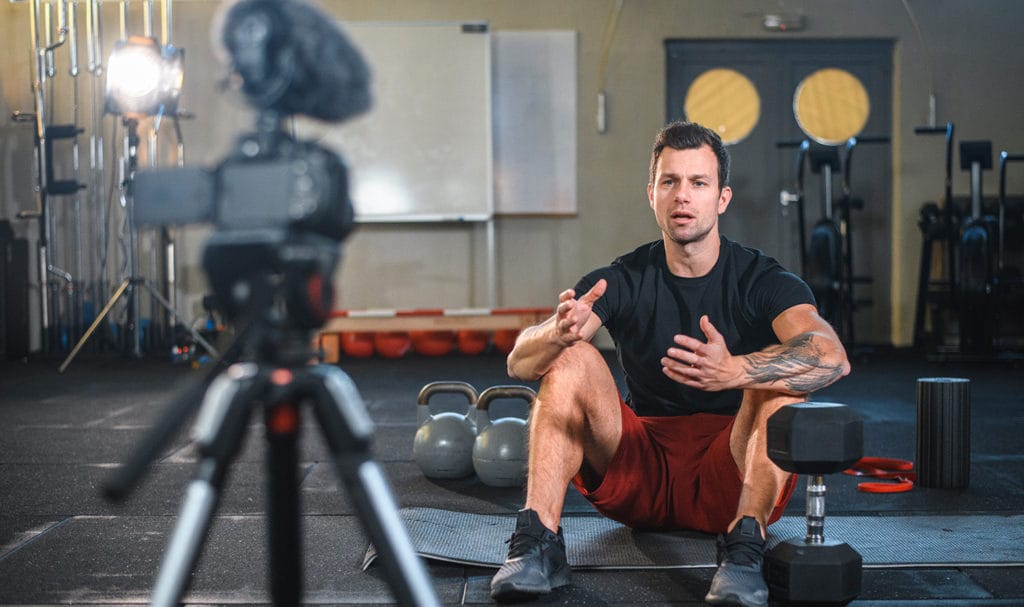
You don’t need high-end equipment to film your fitness videos, just clear video and understandable audio. That means some basic recording equipment and a relatively quiet, well-lit, uncluttered space.
Your recording equipment kit can be as simple as a:
- Smartphone, camera, tablet, or computer
- Phone/camera tripod
- Wireless microphone
- SD card
- Backup battery or charger
If you can’t avoid background noise, don’t have a mic, or just don’t want to use live audio, you can add voiceovers to your videos later. This allows you to ensure clear, audible directions and to provide additional instructions or explanations.
Rey Kifuri, wildlife photographer and former video and social media manager, offers this advice for affordable and effective filming and editing videos:
You don’t need to break the bank to film your fitness videos. A good smartphone can do the job, but a few key pieces of gear can enhance your content. A mirrorless camera like the Canon RP, which you can find used for around $600, paired with a stable tripod like the Manfrotto Compact Action (about $150), can significantly improve your video quality. Additionally, the RODE Wireless GO mics are affordable, easy to use, and great for capturing clear sound in noisy environments. For particularly loud settings like gyms, plugging in a lavalier mic can help isolate your voice. For lighting, a ring light or softbox can make a big difference indoors. If you’re filming outdoors, try to avoid harsh shadows by not filming in direct sunlight.
— Rey Kifuri
If you’re filming in a public space, keep other people — especially kids — out of frame. If other people do appear in the shot, get their permission first. You may need to blur their image or move your setup to avoid them.
Pro tip: If you plan to film in a public gym, review the facility’s privacy policies and get permission first. Depending on the facility, they may have additional rules about filming in their space or may not allow it at all
A few last checks before you hit record:
- Use a test clip to check sound, lighting, framing, and floor space
- Film at an angle where your whole body will be visible through each movement
- Avoid mirrors and windows, or keep items you don’t want to appear in a reflection away from them
- Prep a script to help improve your flow and provide reminders of key points you don’t want to forget
- Rehearse so you can focus on quality audio and video instead of worrying about what comes next
Plus, you can avoid frustrating mid-recording interruptions by making sure your equipment is fully charged and on Airplane or Do Not Disturb mode.
4. Film Your Online Fitness Classes With the Viewer in Mind
Film with your viewers in mind. Show modifications throughout — easier or harder variations that fit different bodies, spaces, equipment, and experience levels — so everyone following along can actually keep up.
Tips and reminders for filming for your viewers:
- Demonstrate exercises from angles that best display proper form
- Face the camera when giving important live-audio instructions
- Speak clearly and cue before movement changes
- Pause long enough for viewers to transition
- Repeat applicable safety and modification reminders
- Be yourself and let your personality shine through!
Remember, if you make a mistake, it’s okay! You’re only human, and not every mistake will be worth starting over for. So, for minor mess-ups simply acknowledge it, correct it, and move on. (The occasional mistake may even endear you more to your clients!)
Recording yourself may feel awkward or overwhelming at first, but it gets easier with time.
Pre-Filming Checklist for Fitness Videos
- Devices are fully charged
- Storage space is available
- Backup file save location is ready
- Microphone or audio source is tested
- Lighting is bright enough to see form clearly
- Background is clean and free of distractions
- Camera framing shows your full body and equipment
- Workout plan is written out
- Modifications are planned
- Warm-up and cooldown are included or clearly explained
- Music is royalty-free or properly licensed
5. Edit Your Workout Video for Clarity and Accessibility
Importing and editing can be the most time-consuming parts of creating online training videos, so make sure to set aside ample time for them. Depending on your filming method, you may need to transfer files to a desktop or laptop computer for final editing.
Editing lets you add accessibility-friendly elements such as overlay text, captions, or voiceovers. Captions are critical for those who may be hard of hearing, watching without sound, or trying to follow along in a loud space. You can also trim dozens of clips from a single long-form video or stitch together different clips to make a longer one.
A few more ways to polish your edit :
- Add chapter markers or section titles
- Balance music so your voice is still clear
- Cut dead air and flubbed takes
- Add text reminders for reps, time, or modifications
- Export in the right format for the destination platform
Pro tip: There are plenty of editing software options out there, but these lists can help you research and choose one that works for you.
- PC Mag’s The Best Video Editing Software for 2026
- PT Distinction’s 9 Video Editing Software for Personal Trainers
6. Upload, Organize, and Back Up Your Exercise and Workout Video Library
Once your videos are edited and ready, upload them wherever you plan to share them. Then save a second copy somewhere else — another drive or platform — so you’re covered if your main one ever goes down.
In addition to social media, like TikTok and Instagram, some options for storing, organizing, and sharing your videos include:
- Vimeo
- YouTube
- Google Drive
- Your business website
Videos are a powerful tool for small businesses. They can help showcase your expertise, build trust with your audience, and attract new clients. Batch filming is a great way to …ensure you always have fresh content ready to go. Optimizing your content for social media platforms — like shooting vertically for Instagram Reels and including captions — can also boost engagement.
Remember, while solid gear can enhance the quality of your videos, creating content that resonates with your audience is what will make the biggest impact.— Rey Kifuri
If storing or presenting your fitness videos on a platform like YouTube or a personal website, choose an organizational format that makes sense for your business. Examples include:
- By length: Under 10 minutes, 20 minutes, 45 minutes
- By client experience level: Beginner, intermediate, advanced
- By purpose: Warm-up, cooldown, individual exercise demos, full class, modifications
- By specialized series or workout type: Pilates, strength, mobility, yoga flow, HIIT
- By equipment: No equipment, dumbbells, resistance bands, a step, or a chair
Choose the Right Platform for Your Online Workout Videos
| Platform | Best For | Considerations |
|---|---|---|
|
TikTok |
Short, trend-friendly fitness content and reach |
Fast-moving format, less control over long-term organization |
|
Instagram Reels |
Short discovery content, quick tips, class previews |
Not ideal for full workouts or organized libraries |
|
YouTube |
Searchable tutorials, public workout videos, free content library |
Public comments, potential copyright concerns, less control over the viewer experience |
|
Vimeo |
Cleaner private video hosting, paid libraries, embedded videos |
May require a paid plan depending on usage |
|
Website library |
Paid programs, client portals, branded video libraries |
Requires more setup and maintenance |
Protect Your Online Fitness Video Instruction
Even when training and teaching virtually, accidents can happen, and you can still be held liable for injuries clients sustain while following one of your videos. That’s where fitness business liability insurance comes in.
Liability insurance is designed to protect you and your small business from the financial consequences of accidents, claims, and lawsuits.
Frequently Asked Questions About Making Successful Workout Videos
How Do I Make a Successful Workout Video?
Start with a clear workout goal, plan your exercises in order, film in a quiet and well-lit space, use clear audio, show modifications, and edit the final video so viewers can follow it without confusion.
Do Fitness Instructors Need Insurance for Online Workout Videos?
Yes. Virtual fitness instruction still comes with risk because viewers follow your cues, workouts, or advice outside of your direct supervision. Fitness business insurance is built to help protect you from these types of liability risks.
So, even though it’s not a legal requirement, online trainers should still have liability insurance to protect themselves from potentially devastating claims and lawsuits.
What Should I Wear in My Workout Videos?
Solid, complementary colors usually work best. Avoid colors that blend into your background and busy patterns to reduce the chance of unwanted visual effects.
Can I Use Music in My Workout Videos?
Yes, you can use publicly available royalty-free music. Using copyright-protected music without permission can lead to your video being taken down and various other legal issues. Plus music that’s too loud can make it harder to hear your instructions.
How Can I Make My Workout Videos More Engaging and Easy to Follow?
Make your videos easier to follow by using clear verbal cues, demoing proper form along with modifications, adding captions, and keeping your full body or key movement patterns visible in the frame. Ideas for making videos more engaging:
- Include intros and outros
- Make eye contact
- Be energetic and show off your personality